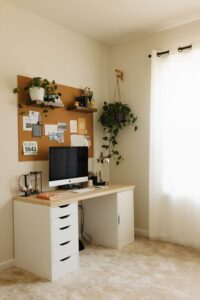
Simple Tips for Organizing a Clutter-Free Home Office Space

Working from home has become a common part of many people’s lives. Having an organized, clutter-free home office space can improve your focus, efficiency, and overall well-being. However, it’s easy for papers, gadgets, and office supplies to pile up and create distractions. This guide offers simple, practical tips to help you organize your home office and maintain a tidy, functional workspace.
Why an Organized Home Office Matters
A cluttered workspace can lead to stress, decreased productivity, and trouble concentrating. When your desk is clean and everything has its place, you can easily find what you need, reduce distractions, and create a positive work environment.
Step 1: Declutter Your Space
Before organizing, it’s important to clear out unnecessary items.
Sort and Purge
– Remove everything from your desk and shelves. Lay items out so you can see everything clearly.
– Sort items into categories: keep, discard, donate, or relocate.
– Be realistic about what you need daily. If you haven’t used something in months, it probably doesn’t need to stay.
Use the “One In, One Out” Rule
To prevent new clutter, aim to remove one item each time you bring another new item into your office.
Step 2: Create Designated Zones
Design your home office with different zones for specific activities.
Work Zone
– This should include your desk, computer, and items you use regularly.
– Keep this area clear of unnecessary items to maintain focus.
Storage Zone
– For supplies, documents, and materials you don’t need immediately.
– Use shelves, cabinets, or filing systems.
Reference Zone
– Place books, manuals, and reference materials here for easy access.
Step 3: Invest in Functional Storage Solutions
Having the right storage tools can make organizing easier.
Desk Organizers
– Use trays or containers for pens, paper clips, and sticky notes.
– A vertical organizer can help contain mail or folders without taking up much desk space.
Filing Systems
– Use a filing cabinet or portable file box.
– Label folders clearly by categories such as “Invoices,” “Projects,” or “Receipts.”
Shelving
– Wall-mounted shelves free up floor space.
– Use decorative bins or boxes to keep items tidy.
Cable Management
– Use clips or cable sleeves to keep cords under control and eliminate tangles.
Step 4: Keep Technology Tidy
Technology is essential but can add to clutter.
– Regularly clean cords and equipment.
– Consider wireless devices to reduce cables.
– Use a docking station for laptops to minimize desktop gadgets.
Step 5: Make It Personal but Minimal
Personal touches can make your space inviting, but too many decorations create clutter.
– Choose 1-2 items such as a small plant or a favorite photo.
– Avoid overcrowding the desktop or shelves.
Step 6: Establish Daily and Weekly Routines
Maintaining your space means building good habits.
Daily
– Spend 5 minutes at the end of each workday tidying your desk.
– Put away items and sort through papers.
Weekly
– Do a deeper clean and reorganize any messy areas.
– Reassess storage needs and purge unnecessary items.
Step 7: Optimize Lighting and Airflow
Good lighting reduces eye strain and helps you stay alert.
– Place your desk near natural light sources if possible.
– Use adjustable lamps to brighten your workspace.
– Keep your office well-ventilated for fresh air.
Bonus: Use Digital Tools to Cut Paper Clutter
Scanning documents or using digital notes can reduce physical clutter.
– Apps like Evernote or OneNote help organize notes and files.
– Digital calendars and task apps reduce the need for physical planners.
Final Thoughts
Organizing a clutter-free home office doesn’t have to be overwhelming. With a clear plan and simple steps, you can create a neat, comfortable space that supports your productivity and peace of mind. Remember, the key is consistency: regularly declutter, organize, and maintain your workspace to keep distractions at bay.